
IoT Setpoints Hello World
What you will learn in this tutorial:
- Hardware setup to remotely control the LEDs
- Message Setup
- Iottly Code
Preconditions
After connecting your Raspberry Pi:
you can follow this tutorial.
Hardware setup
- In this exercise we are going to use pins #23 and #24 to control the intensity of two LEDs by means of the PWM protocol
- PWM (pulse width modulation): here
- Create a circuit like the one in the sketch
- The two green wires connect the LEDs’ anode to RPi Pins #23 and #24 (through two 220Ohm resistors)
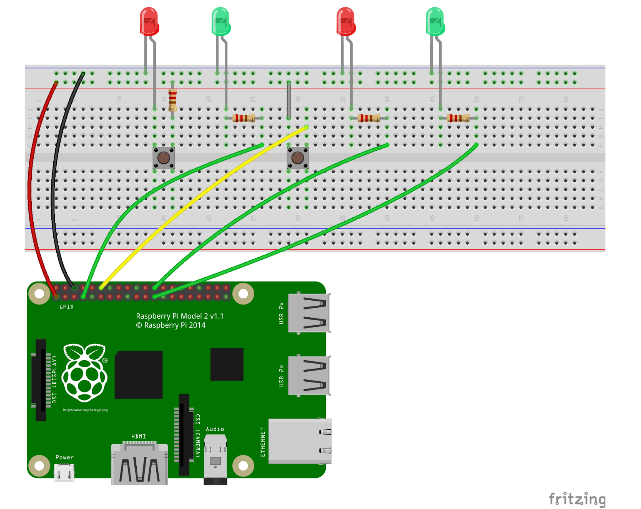
Raspberry Pi 1 Rev 1 Pinout reference here
Raspberry Pi 1 Rev 2 Pinout reference here
Raspberry Pi 2/3 Pinout reference here
Raspberry Pi zero w Pinout reference here
Let’s use Iottly to configure a command to remotely control the LEDs
Message Setup
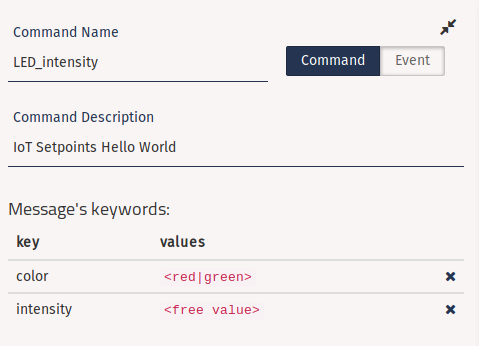
Create the following message:
- Name:
- LED_intensity
- Description:
- IoT Setpoints Hello World
- We need two keywords:
- “color”: to tell the board which LED we want to control
- Type: Multiple Value
- Values:
- red
- green
- “intensity”: to tell the board the intensity value we want to set for the LED
- Type: FreeValue
- Any value in [1, 100] (expressed as %)
- “color”: to tell the board which LED we want to control
Iottly Code
In the “Management Scripts” panel edit the following snippets:
globals:- Add a global dictionary to map colors to PWM objects
- The
COLOR_TO_PWM_MAPdictionary needs to be global since it will be accessed by both theinitand theLED_intensityfunctions
- The
- Add a global dictionary to map colors to PWM objects
#add at the end of globals:
COLOR_TO_PWM_MAP = {}
init- Initialize Pin #23 and #24 to be managed as output
- Create PWM objects for each pin and store them in the
COLOR_TO_PWM_MAPdictionary - 60 is the base frequency for the modulation
def init():
  #...
  # here your code!!
  pin = "7"
  GPIO.setup(int(pin), GPIO.OUT)
  pin = "12"
  GPIO.setup(int(pin), GPIO.IN, pull_up_down=GPIO.PUD_DOWN)
  GPIO.add_event_detect(int(pin), GPIO.BOTH, callback=button_pressed, bouncetime=200)

  GPIO.setup(23, GPIO.OUT)
  GPIO.setup(24, GPIO.OUT)
  COLOR_TO_PWM_MAP.update({
    'green': GPIO.PWM(23, 60),
    'red': GPIO.PWM(24, 60),
  })
  #-----------------------------------------------------------------------------#
LED_intensity:- Keep in mind the format of the incoming message:
{"LED_intensity":{"color":"<red|green>","intensity":"<freevalue>"}}
- Keep in mind the format of the incoming message:
def LED_intensity(command):
  #...
  cmdpars = command["LED_intensity"]
  #...
  #-----------------------------------------------------------------------------#
  # here your code!!
  led_color = cmdpars.get('color', 'red')
  pwm = COLOR_TO_PWM_MAP.get(led_color)
  intensity = int(cmdpars.get('intensity', 100))

  pwm.start(intensity)
  #-----------------------------------------------------------------------------#
- The color keyword is used to obtain the pwm object from the
COLOR_TO_PWM_MAPdictionary - The intensity keyword is used to start a PWM with the desired duty cycle

- Test the “IoT Setpoints Hello World” from the Console